

Overview
When Bifrost acts as an MCP Gateway, external MCP clients connect to its/mcp endpoint. This page covers how those inbound clients authenticate to Bifrost.
There are two ways a client can present itself:
- Header credentials — a virtual key, API key, or session token sent as a request header. Simple to script, ideal for backend and machine-to-machine use.
- OAuth 2.1 — Bifrost acts as an OAuth authorization server, and the client connects through a browser consent flow, receiving a short-lived JWT. Ideal for interactive clients like Claude Desktop, Claude Code, or Cursor, where pasting a raw key into client config is awkward.
This page is about authenticating clients to Bifrost. For how Bifrost authenticates to upstream MCP servers it connects to, see the outbound Authentication guides instead — that’s the opposite direction.
Authentication Modes
A single setting,mcp_server_auth_mode, controls which credential types /mcp accepts:
headers—/mcpaccepts header credentials only. The OAuth surface is not served: the.well-knowndiscovery endpoints and the issuance endpoints (/oauth2/register,/oauth2/authorize,/oauth2/token) all return404.both—/mcpaccepts header credentials and Bifrost-issued JWTs. Discovery is served so OAuth clients can connect.oauth—/mcpaccepts Bifrost-issued JWTs only; header credentials are rejected.
x-bf-vk, X-Api-Key, or a Bearer VK) arrive on the same request, Bifrost rejects it with a conflicting credentials error — even in both mode. both means either credential is accepted, not both at once.
How the OAuth Connect Flow Works
Whenmcp_server_auth_mode is both or oauth, Bifrost is a full OAuth 2.1 authorization server for the /mcp resource. A client that doesn’t yet have a token discovers the server, registers itself, and walks the user through a browser consent step.
The flow follows current OAuth standards so off-the-shelf MCP clients work without custom code:
- Protected resource metadata (RFC 9728) — the
401response points clients at the discovery documents. - Dynamic Client Registration (RFC 7591) — clients self-register; no manual client setup.
- PKCE (S256) — public clients authenticate without a shared secret.
- Resource indicators (RFC 8707) — tokens are bound to the
/mcpresource via theaudclaim.
Identity Modes at Consent
During the consent step, Bifrost shows the user how they can identify themselves. The page header names the connecting client — for example “Claude Code wants to connect” — and offers the modes available for your deployment: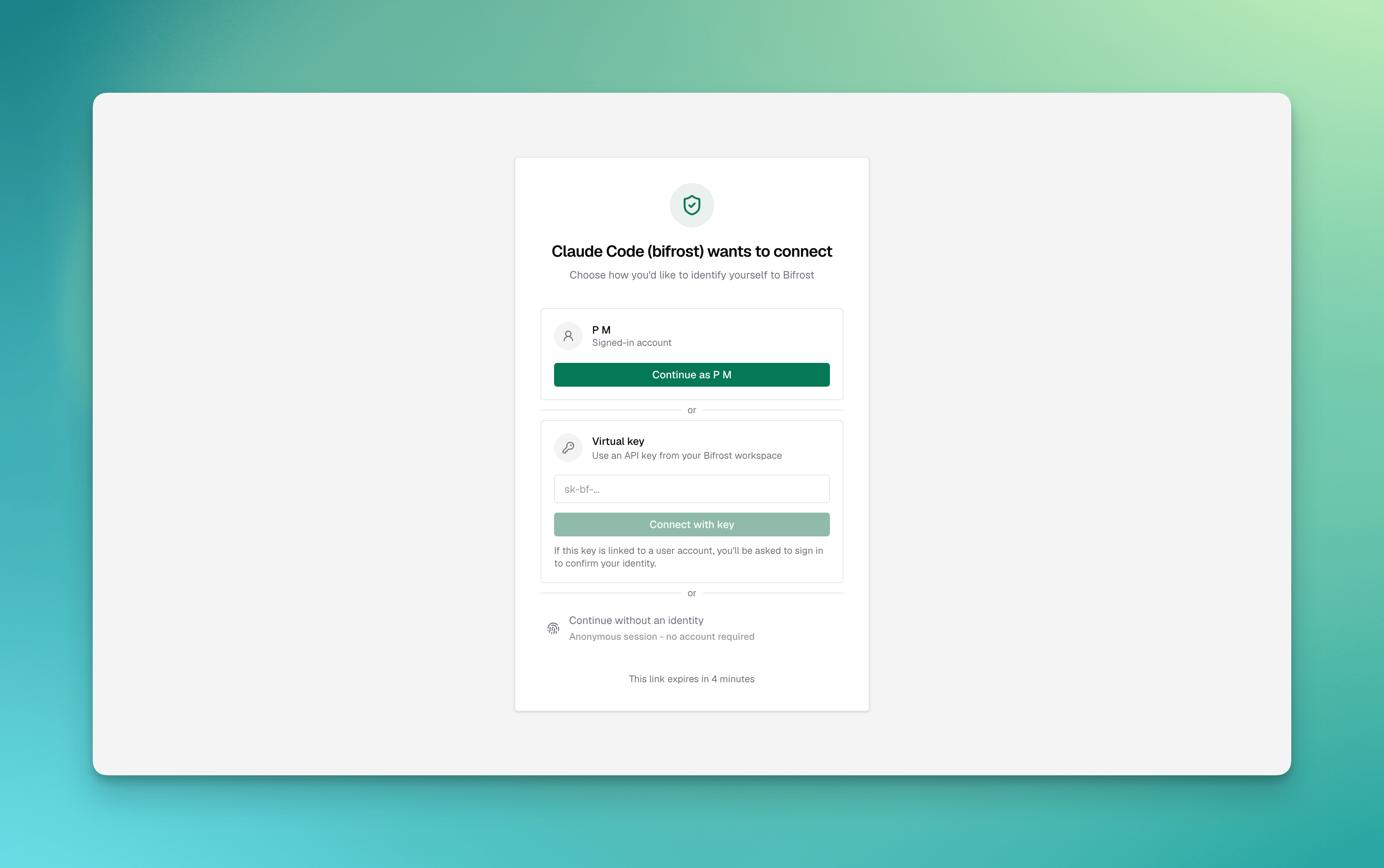
- Virtual key carries the same governance (budgets, rate limits, tool scoping) the key already has — the JWT simply represents that key.
- Session is an anonymous identity for development and open deployments. Because the grant itself carries no identity, Bifrost only lets a signed-in person hand it out: the consent page offers session mode when the browser has a valid dashboard session (or an SSO user), and
PUT /api/oauth2/consent/flows/{id}answers401to a session-mode submit that arrives with only the consent link’s token. Running with dashboard auth disabled does not count as being signed in. Session mode is unavailable altogether onceenforce_auth_on_inferenceis on. - User binds the grant to the authenticated person, so per-user upstream tool authorizations unify under one identity.
User mode requires SSO/SCIM (enterprise). When no identity provider is configured, the consent page offers virtual key mode, plus session mode when the consenting person is signed in to the dashboard.
Configuration
- Web UI
- API
- config.json
- Open Config and go to the MCP settings.
-
Set MCP Server Auth Mode to
headers,both, oroauth. -
When using
bothoroauth, set the OAuth Server settings: an Issuer URL (required, since otherwise the issuer would be derived from the unauthenticated requestHostheader), and the Authorization Code and Access Token lifetimes. -
Click Save.
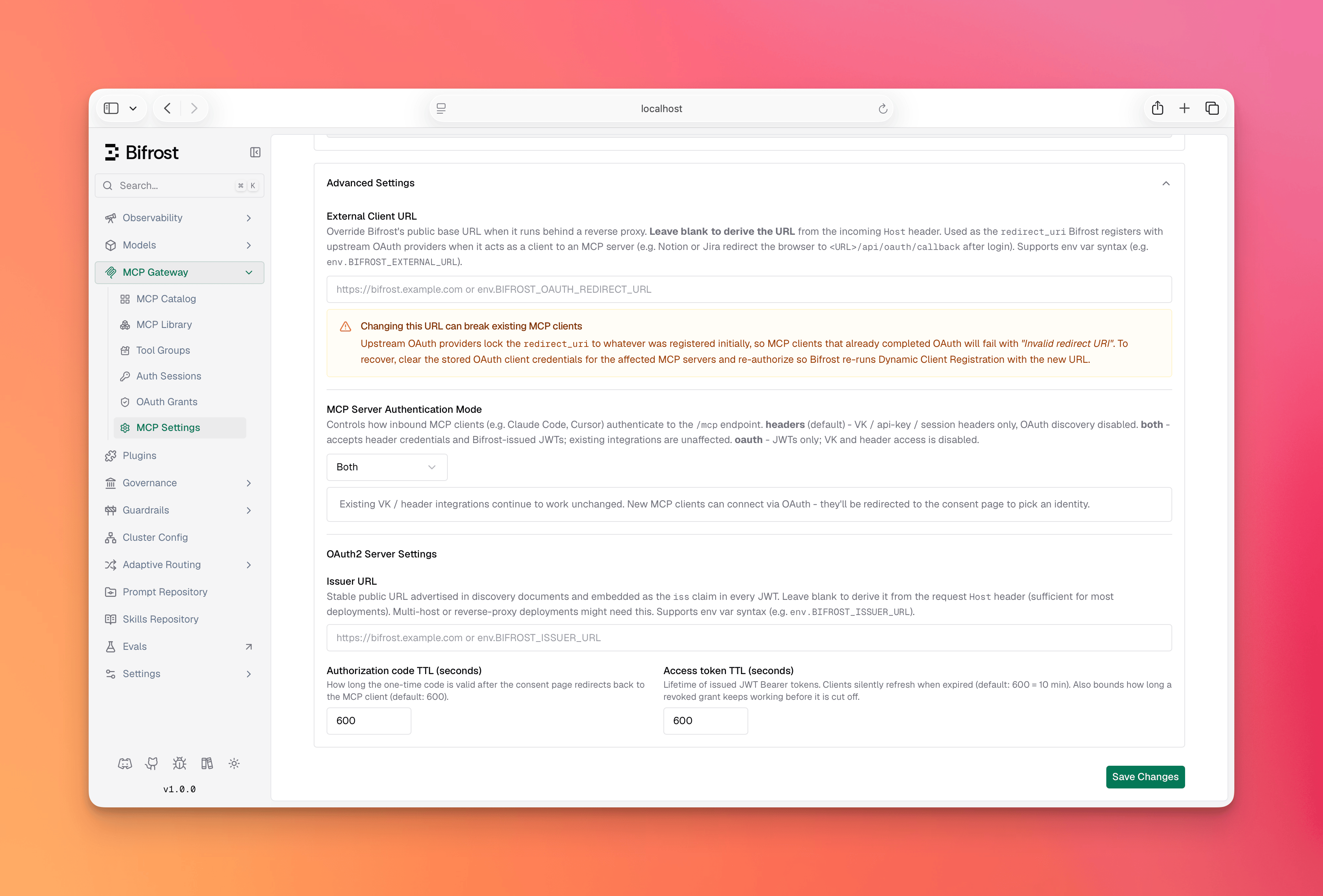
oauth2_server_config only applies when mcp_server_auth_mode is both or oauth. The RSA signing key used for JWTs is generated automatically the first time it’s needed — no setup required. It is persisted to the database, so it survives restarts and is shared across all replicas; previously issued tokens stay valid after a restart.Connecting a Client
Withboth or oauth enabled, point the MCP client at Bifrost’s /mcp URL — for example https://bifrost.example.com/mcp. No key needs to be pasted into the client config.
- The client hits
/mcp, gets a401, and discovers the authorization server. - It registers itself and opens a browser to the consent page.
- The user chooses an identity (virtual key, session, or user).
- The client receives a token and connects; aggregated tools become available.
Managing Grants
Each completed OAuth connection is a grant — a refresh-token lineage Bifrost issued to a client. The OAuth Grants page lists them: the client, the bound identity, when the grant was created, and when it was last used, with a Revoke action.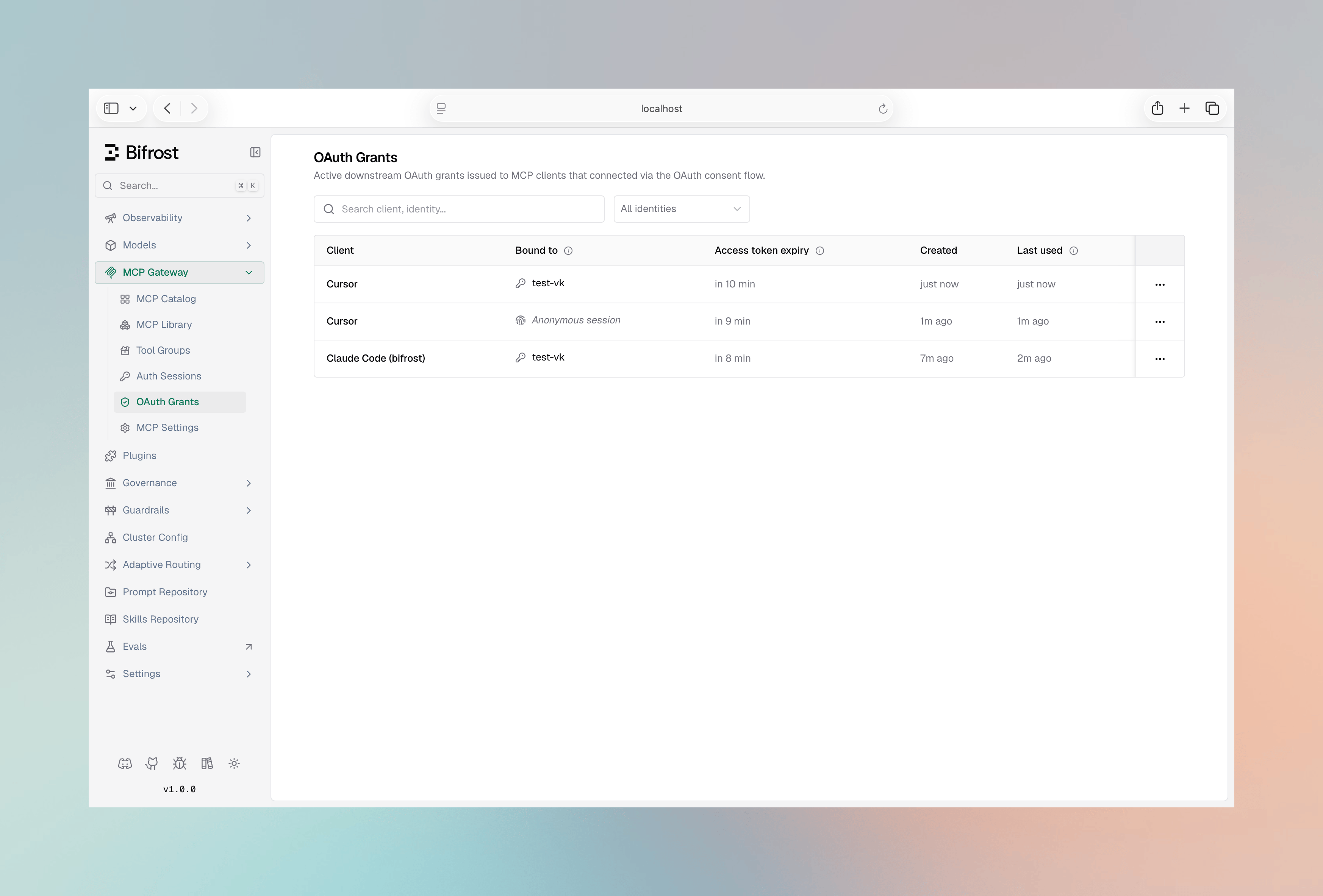
GET /api/oauth2/sessions (list active grants, filtered and paginated) and DELETE /api/oauth2/sessions/{id} (revoke a grant), so the same operations are scriptable.
A revoked grant’s current access token is a short-lived JWT that keeps working on
/mcp until it expires (up to access_token_ttl, default 600 seconds). After that the client is fully cut off and must reconnect through the consent flow.This is deliberate: a holder of the virtual key or user credentials can always start a new authorized session, so invalidating the access token mid-flight adds little security while costing a per-request lookup. Lower access_token_ttl for a tighter window.The OAuth Grants page lists credentials Bifrost issued to clients for inbound
/mcp access. This is distinct from MCP Sessions, which tracks per-user credentials Bifrost holds for upstream MCP servers.Token Lifetime & Revocation
- Access tokens are JWTs valid for
access_token_ttl(default 600s). On every/mcprequest Bifrost validates the JWT (signature, expiry, issuer, and audience) and confirms the bound identity still exists: a user-mode token is rejected with401when the user is gone, and a vk-mode token resolves to its key, which governance refuses with403when it is inactive or expired, the same way the inference endpoints refuse it. The identity check reads an in-memory cache, so in the common case it adds no database round-trip (vk-mode falls back to a single store lookup only on a cache miss). - Refresh tokens rotate on each use and have no fixed expiry. A token is invalidated by rotation, by the bound virtual key or user becoming inactive or deleted, or by an explicit revoke.
- An explicit revoke marks the grant’s refresh-token row revoked, so renewals stop immediately — but it does not remove the bound identity, so the identity check still passes and the already-issued access token keeps working until it expires. Lower
access_token_ttlto shorten that window. - Deleting the bound virtual key or user is stronger than revoking a grant: it revokes the grant immediately and the identity check rejects the grant’s already-issued access token on its next
/mcprequest, instead of letting it live out its TTL. - Enabling
disable_vk_identity(require identity-provider login) cuts off all virtual-key–mode grants immediately — they are rejected at/mcpand denied on refresh — so those clients must re-authenticate as a user. Only applies inoauthmode with an identity provider configured. - Enabling
enforce_auth_on_inferenceblocks session-mode (anonymous) tokens at/mcp, but does not delete or invalidate their grants — the grants remain in the database and become valid again if enforcement is later disabled. To remove a session-mode grant permanently, revoke it on the OAuth Grants page.
Discovery Endpoints
When discovery is enabled (both or oauth), Bifrost serves the standard documents MCP clients fetch automatically:
In
headers mode these endpoints return 404, as do the issuance endpoints /oauth2/register, /oauth2/authorize and /oauth2/token. Discovery responses are sent with Cache-Control: no-store so a shared cache or CDN in front of Bifrost never serves a stored copy.
Client registration bounds its free-text fields: client_name up to 2048 bytes, scope up to 4096 bytes, and at most 32 redirect_uris of up to 2048 bytes each. The authorize request bounds state to 8192 bytes. Anything larger is refused with 400 before any state is stored.
Troubleshooting
Discovery returns 404
Symptom: A client can’t discover the authorization server;.well-known endpoints return 404.
Cause: mcp_server_auth_mode is headers, so the OAuth surface is disabled.
Fix: Set the mode to both or oauth.
Header credential rejected on /mcp
Symptom: A virtual key or API key that worked before now gets a401.
Cause: mcp_server_auth_mode is oauth, which accepts JWTs only.
Fix: Use both to accept header credentials alongside OAuth.
Key refused with 403 on /mcp
Symptom: A request with a valid virtual key gets403 with virtual key is inactive or virtual key has expired.
Cause: The key authenticated, but governance refuses it, exactly as it would on an inference request.
Fix: Reactivate the key or extend its expiry; the change applies on the next /mcp request.
Conflicting credentials on /mcp
Symptom:conflicting credentials: an OAuth token and a virtual key header were both provided.
Cause: The client completed an OAuth flow but is also configured with a VK header, so both arrive on one request. Claude Code does this in both mode when the VK is set under x-bf-vk / X-Api-Key instead of Authorization.
Fix: Send only one credential — remove the VK header, or configure it as Authorization: Bearer <vk> so the client uses header auth and skips OAuth.
Session option missing, or session consent returns 401
Symptom: The consent page offers only Virtual key, or submitting Session returns401 with session mode requires an authenticated consenting user.
Cause: Session mode grants an anonymous identity, so only a signed-in person can hand it out. The consent link’s own token is not a sign-in, and neither is running with dashboard auth disabled.
Fix: Sign in to the Bifrost dashboard in the same browser and reopen the consent link, or authorize with a virtual key instead.
Client keeps re-opening the browser
Symptom: The consent flow runs on every connection. Cause: The client isn’t persisting its tokens, or its refresh token was revoked. Fix: Confirm the client stores its credentials; check the OAuth Grants page to see whether the grant was revoked.Token rejected after issuer change
Symptom: Previously issued tokens fail validation after changingissuer_url.
Cause: The iss claim in existing tokens no longer matches the configured issuer.
Fix: Clients reconnect to obtain tokens with the new issuer.
Save rejected with “issuer_url must be set”
Symptom: Switchingmcp_server_auth_mode to both or oauth is rejected with a 400 mentioning issuer_url.
Cause: issuer_url is required whenever discovery is enabled; see the warning above.
Fix: Set oauth2_server_config.issuer_url to Bifrost’s stable public URL in the same request.
Next Steps
- Bifrost as an MCP Gateway — Expose aggregated tools to external MCP clients.
- MCP Sessions — Inspect and manage per-user credentials for upstream servers.
- Virtual Keys — Govern budgets, rate limits, and tool scope for the identities behind grants.